Bringing Foxbot to Life in Handmade Designs
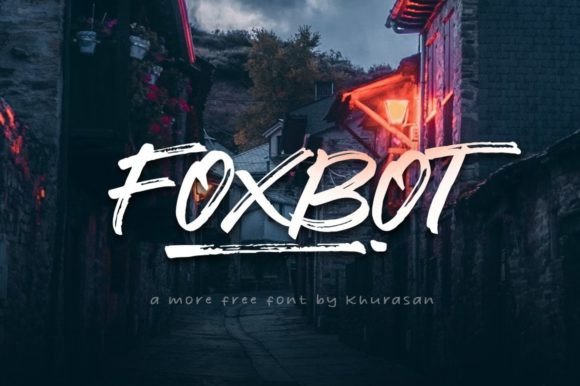
I was working late one evening, setting up a new line of hand-poured soy candles, when I stumbled upon Foxbot. It wasn’t just any font—it had this warm, brushed handwritten feel that made me pause. I opened my design software, typed out “Cozy Glow” in Foxbot, and suddenly, the label felt like it belonged on the candle itself. That’s when I knew: this font was going to be a staple in my creative toolkit.
A Font with Personality
Foxbot has a unique charm that feels both modern and personal. It’s not too ornate, but it carries a sense of care and intention. The brush strokes give it a soft, organic look that’s perfect for adding character to handmade products. Whether I’m designing a greeting card or labeling a jar of homemade jam, Foxbot adds that extra layer of warmth that makes customers stop and take notice.
The visual personality of Foxbot is what sets it apart from other free fonts. It’s versatile enough to work with minimalist designs yet expressive enough to make a statement. I’ve used it for everything from wedding invitations to boutique tags, and each time, it brings a sense of authenticity to the project.
From Labels to Wall Art: Real-World Applications
One of my favorite uses for Foxbot has been on candle labels. I love how it pairs well with simple, earthy colors and complements natural materials like wood or linen. For instance, I created a set of seasonal candle labels using Foxbot—each one featured a different holiday phrase, like “Merry & Bright” or “Wishing You Joy.” The font gave the labels a personal touch that elevated the whole product line.
It’s also worked wonders on greeting cards. I recently designed a line of birthday cards using Foxbot for the main text and paired it with a clean sans serif font for the body copy. This combination helped keep the design balanced while still feeling heartfelt and artistic.
For digital printables, I’ve found that Foxbot looks great on planner pages and printable wall art. Its slightly irregular strokes add a handmade quality that feels more authentic than perfectly aligned digital fonts. I often use it for quotes or motivational phrases, and it always draws compliments from buyers.
Designing with Purpose: Readability and Presentation
When working with Foxbot, I always consider readability. While it’s a display font, it works best for short phrases, names, and titles. For longer text, I pair it with a simpler font to ensure legibility. On small stickers or product labels, I test the font at different sizes to make sure it remains clear and doesn’t get lost in the details.
I’ve also learned that font pairing plays a big role in the final outcome. When I used Foxbot for a farmhouse sign, I paired it with a bold serif font for the background text. This contrast made the sign feel both rustic and modern, which fit the overall theme perfectly.
Choosing the Right Tools and Formats
Before diving into a new project, I always check the font styles and file formats included with Foxbot. It’s important to know whether it comes with alternates, ligatures, or swashes, especially if I plan to use it for commercial purposes. For physical products, I ensure that the font supports the languages I need and that I have the proper licensing if I’m selling templates or digital downloads.
When preparing mockups, I use Foxbot in both digital and printed formats to see how it translates across mediums. I’ve found that it holds up well on paper, fabric, and even vinyl for stickers. It’s a reliable choice for creators who want to maintain brand consistency across all their shop materials.
Emotional Appeal and Brand Consistency
Foxbot has become a key element in building my brand identity. Its warm, approachable style helps create an emotional connection with customers. Whether it’s on a tote bag, mug, or packaging, the font conveys a sense of care and creativity that aligns with the handmade nature of my products.
By using Foxbot consistently across my shop, I’ve noticed that customers start to recognize the font as part of my brand. It adds a layer of familiarity that makes them feel more connected to my work. This kind of recognition is invaluable for small shop owners looking to build a loyal customer base.
Final Tips for Using Foxbot
If you’re considering using Foxbot for your own projects, here are a few tips to keep in mind:
- Test it on different surfaces and sizes to ensure it works well for your intended use.
- Pair it with complementary fonts to maintain balance in your designs.
- Check the licensing details if you plan to sell products or offer digital downloads.
- Use it for short, impactful phrases where its personality can shine through.
Foxbot has become more than just a font—it’s a creative companion that helps bring my ideas to life. From candle labels to wall art, it adds a personal touch that makes every project feel more meaningful. And the best part? It’s a freebie that anyone can access and use to elevate their handmade creations.